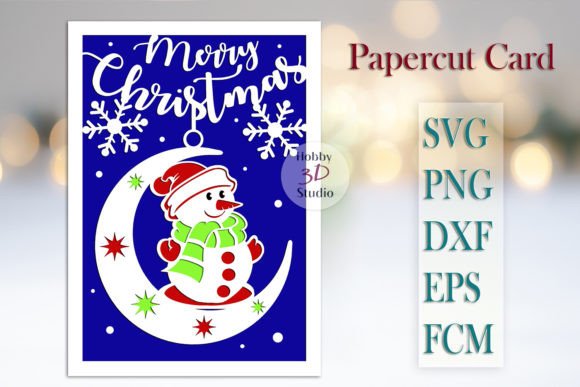
Evaluating Merry Christmas Card Paper Cut Templates for Holiday Crafting Projects
As the holiday season approaches, the demand for personalized, handmade greeting cards surges among crafters and design enthusiasts. For those equipped with digital cutting machines, Merry Christmas Card Paper Cut Templates offer a streamlined pathway to creating intricate, professional-looking stationery without the need to draft designs from scratch. These digital files serve as a bridge between creative vision and technical execution, allowing users to produce high-quality cards for family and friends efficiently. Understanding the nuances of these templates, their compatibility with various hardware, and their limitations compared to other crafting methods is essential for making an informed decision on whether they fit your specific project needs.
Defining the Digital Template Advantage
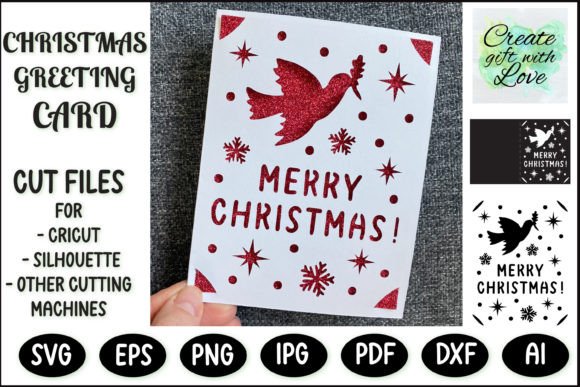
At their core, Merry Christmas Card Paper Cut Templates are vector-based or path-defined digital files designed specifically for die-cutting machines. Unlike traditional stencils or physical dies that require storage space and can wear out over time, these are instant download assets. Once purchased, the user receives files in formats such as SVG, DXF, or FCM, which can be imported directly into software like Cricut Design Space, Silhouette Studio, or Brother ScanNCut Canvas.
The primary distinction of these templates lies in their precision and scalability. A well-designed template includes not only the cut lines for the decorative elements but also score lines—often indicated by dotted paths—to ensure the card folds cleanly at the exact center. This level of detail is difficult to achieve manually, especially with complex lace-like patterns common in Christmas designs. The ability to instantly access a library of designs means crafters can switch styles rapidly, moving from a minimalist modern aesthetic to a traditional Victorian look within minutes, provided they have the appropriate cardstock on hand.
Compatibility and Format Considerations
One of the most critical factors in evaluating these templates is file format compatibility with your specific cutting machine. The market is fragmented by proprietary software ecosystems, and a template that works seamlessly on one device may require conversion or additional steps on another.
- Cricut Users: Those utilizing Cricut machines typically rely on SVG (Scalable Vector Graphics) files. These files preserve layer information, allowing users to separate cut lines from score lines easily within Design Space. The workflow is generally intuitive, making these templates highly accessible for beginners.
- Silhouette Owners: Silhouette Studio offers flexibility depending on the software edition. Users with the Basic Free Edition often require DXF (Drawing Exchange Format) files, which strip away some advanced layering features but remain universally compatible. Upgraded versions of the software can handle SVGs, offering a experience similar to Cricut users.
- Brother ScanNCut: Brother machines utilize FCM (Fabric Cut Machine) or SVG files. The native FCM format is optimized for the machine's onboard scanning and cutting capabilities, though SVG support has expanded the range of third-party templates available to these users.
Before purchasing any Merry Christmas Card Paper Cut Templates, it is imperative to verify that your machine supports the listed formats. Attempting to use an unsupported file type can lead to frustration, requiring third-party conversion tools that may alter line weights or distort delicate details.
Scalability and Physical Limitations
A significant advantage of digital templates is their scalability. Most Merry Christmas Card Paper Cut Templates are designed with a standard folded size of 5x7 inches (12.5 x 17.5 cm). However, because they are vector-based, they can theoretically be resized to fit larger mats, accommodating those who wish to create statement pieces or wall art. This flexibility allows crafters to adapt a single design for various purposes, from small gift tags to large festive decorations.
However, this scalability comes with a crucial trade-off: the risk of downscaling. While increasing the size is generally safe provided the cutting mat is large enough, reducing the size of the card is strongly discouraged. Intricate paper cut designs rely on specific line thicknesses and spacing to maintain structural integrity. If a template is shrunk below its intended dimensions, the negative spaces between cuts may become too small for the blade to navigate, leading to tearing, incomplete cuts, or the infamous "bird's nest" where the paper jams in the machine. Furthermore, tiny paper fragments resulting from excessive downscaling are notoriously difficult to weed (remove) without damaging the surrounding design.
Comparison with Alternative Crafting Methods
To determine if digital templates are the right choice, it is helpful to compare them against alternative methods of card creation.
Digital Templates vs. Hand-Drawn Designs
Creating a card from scratch offers unlimited creative freedom but demands a high level of artistic skill and time investment. Hand-drawing complex geometric or lace patterns requires precision that even experienced artists may find tedious to replicate multiple times. Merry Christmas Card Paper Cut Templates eliminate the drafting phase, ensuring symmetry and consistency across a batch of cards. For crafters producing gifts for a large list of friends and family, the time saved by using pre-made templates is substantial.
Digital Templates vs. Physical Dies
Physical metal dies are a popular alternative for embossing and cutting. While they provide a tactile, sturdy tool, they are limited to a single size and shape. Purchasing a collection of physical dies for every variation of a Christmas card can become expensive and require significant storage space. Digital templates, conversely, offer a vast library of designs for a fraction of the cost and occupy no physical space until printed. However, physical dies may still hold an edge for users who prefer a completely analog workflow without the need for computers or software updates.
Digital Templates vs. Laser Cutting Services
For those without personal cutting machines, outsourcing to a laser cutting service is an option. While laser cutters can handle even finer details than hobbyist blade machines, the turnaround time and cost per unit are significantly higher. Digital templates empower the user to produce cards on-demand at home, offering immediate gratification and lower marginal costs per card after the initial equipment investment.
Practical Application and Best Practices
Successfully implementing these templates requires attention to material selection and machine settings. The recommendation to cut the card at 7.5 inches without folding suggests a specific workflow where the score line is treated as a partial cut or a distinct operation. Users should ensure their cardstock weight matches the complexity of the design; heavier stocks (80lb cover or higher) provide better stability for intricate cuts but may require multiple passes or a deeper blade setting.
Color customization is another area where these templates shine. Since the file provides the structure, the crafter has total control over the aesthetic. By using different colored cardstocks for layered elements or adding foil accents post-cutting, a single template can yield dozens of unique variations. Some advanced users even utilize the templates to create masks for painting or ink blending, expanding the utility beyond simple paper cutting.
Decision Factors for the Modern Crafter
Ultimately, the decision to utilize Merry Christmas Card Paper Cut Templates depends on your balance of time, skill, and equipment. These resources are ideal for individuals who own a compatible cutting machine and seek to produce high-volume, professional-grade cards without the learning curve of vector illustration software. They are particularly well-suited for decorators and designers looking for premade works that can be quickly adapted to specific color schemes.
Conversely, if your cutting machine has a small mat capacity that prevents resizing, or if you strictly prefer organic, imperfect lines that characterize hand-torn paper, these precise digital files may feel too rigid. Additionally, users unwilling to troubleshoot software imports or manage file formats might find the technical setup a barrier.
In the landscape of holiday crafting, these templates represent a pragmatic solution that leverages technology to enhance creativity. By understanding the technical requirements regarding file formats, sizing constraints, and machine capabilities, crafters can effectively integrate these tools into their workflow, ensuring a festive and efficient holiday season.