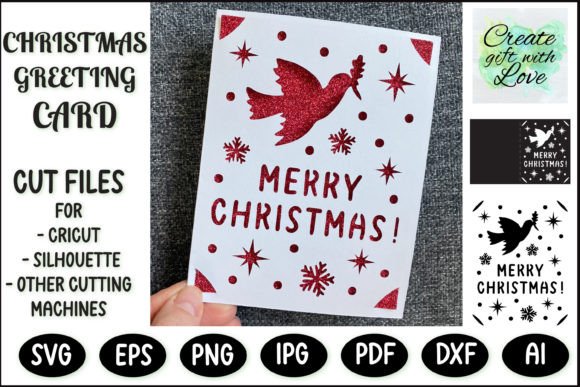
Evaluating the Merry Christmas Card SVG Template for Holiday Crafting
The holiday season often brings a desire to create personalized gifts and correspondence that stand out from mass-produced options. For crafters utilizing digital cutting machines, the Merry Christmas Card SVG Template offers a structured yet flexible solution for producing professional-looking greeting cards. This digital file format serves as a blueprint for die-cutting machines, allowing users to transform standard cardstock into intricate papercut designs. Understanding the capabilities, limitations, and practical applications of this template is essential for determining whether it aligns with your specific crafting goals and equipment.
Understanding the Digital File Format
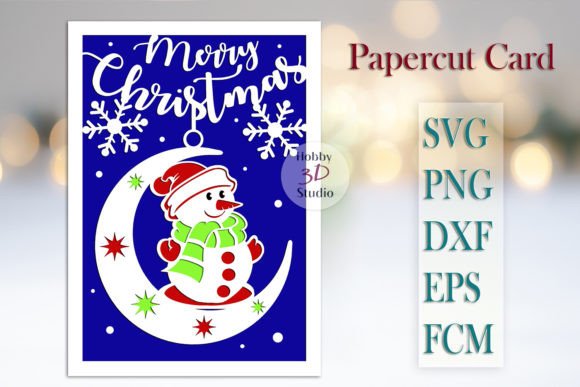
At its core, a Merry Christmas Card SVG Template is a vector graphic file designed specifically for compatibility with electronic cutting machines such as the Cricut Joy, Maker, Explore, Silhouette Cameo, and Brother ScanNCut. Unlike raster images (like JPEGs or PNGs) which are made of pixels, SVG files use mathematical paths to define shapes. This ensures that the design can be scaled up or down without losing resolution or clarity. When loaded into software like Cricut Design Space or Silhouette Studio, the file provides precise cut lines for the machine to follow.
The specific template in question typically includes layers or separate paths for the card base, the decorative front panel featuring a Christmas tree motif, and an insert for writing messages. The standard finished dimensions for this design are usually 4.25″ x 5.5″, which corresponds to the A2 card size, a common standard for greeting cards. The internal insert is generally sized at 4″ x 5.25″ to fit neatly inside the folded card without overlapping the edges. While these are the default measurements, the vector nature of the SVG allows crafters to resize the entire project to create larger statement pieces if desired.
Reasons to Choose a Pre-Made SVG Template
Crafters often evaluate whether to design a card from scratch or utilize a pre-made template. There are several compelling reasons to select a Merry Christmas Tree Card SVG template cut file over starting with a blank canvas. First, it significantly reduces the time required for the design phase. Creating a balanced layout with proper spacing for cut-outs and structural integrity requires a level of graphic design skill that not all hobbyists possess. A professionally drafted template ensures that thin paper bridges are wide enough to hold the design together during the weeding and folding process.
Furthermore, using a standardized template guarantees consistency. If you intend to produce a batch of cards for family, friends, or business associates, a single SVG file ensures that every card looks identical in structure. This is particularly important for papercut cards, where slight variations in cut paths can lead to structural failures or misaligned layers. The template acts as a reliable foundation, allowing the crafter to focus on material selection and assembly rather than troubleshooting design errors.
Benefits and Practical Advantages
The primary benefit of utilizing a Merry Christmas Card SVG Template is the ability to achieve complex papercut aesthetics with relative ease. These designs often feature delicate trees, stars, or typography that would be incredibly tedious and prone to error if cut by hand with a craft knife. The precision of a machine guided by an SVG file results in clean edges and uniform details that elevate the perceived quality of the final product.
Another significant advantage is material efficiency. Because the digital file defines the exact boundaries of the cut, users can optimize their mat usage, fitting multiple cards onto a single sheet of cardstock to minimize waste. Additionally, the separation of the card base and the insert allows for functional versatility. The outer layer provides the visual impact of a papercut silhouette, while the solid inner insert offers a smooth, uninterrupted surface for handwriting personal messages, which can sometimes be difficult on textured or cut-out surfaces.
Considerations and Tradeoffs
While the benefits are clear, there are tradeoffs and considerations to keep in mind before downloading and cutting. The most critical factor is machine compatibility and settings. Although the file works with various brands like Cricut, Silhouette, and Brother, each machine interprets cut pressure and speed differently. Users must understand their specific machine's requirements for the type of cardstock they intend to use. A design that cuts perfectly on a Cricut Maker with a Fine Point Blade might require adjusted pressure settings on a Silhouette Cameo to avoid tearing delicate paper bridges.
Material selection is another variable that impacts the outcome. The template is designed for cardstock, but the weight of that cardstock matters. Lighter cardstock (65-80 lb) may be easier to cut but can lack the rigidity needed for a standing card or may tear during the weeding process if the design features very fine details. Heavier cardstock (100 lb+) provides durability but may require multiple passes or a deeper blade setting, potentially risking the integrity of intricate cutouts. Crafters must test their materials to find the sweet spot between aesthetic delicacy and structural strength.
Additionally, while the SVG allows for resizing, enlarging the design beyond its intended proportions can sometimes expose weaknesses in the original vector paths if they were not drafted with scaling in mind. Conversely, shrinking the design too much might make the "weeding" process—the removal of excess paper—extremely difficult, especially for small interior cuts within letters or tree branches.
Ideal Use Cases
This type of template is a strong fit for several specific scenarios. It is ideal for individuals who want to send high-volume holiday greetings without sacrificing a handmade touch. Small business owners looking to include a branded, personalized note with customer orders during the holidays will also find this efficient. The professional look of a machine-cut papercut card conveys effort and care without requiring hours of manual labor per unit.
It is also well-suited for crafters who enjoy the assembly process more than the design process. Those who prefer selecting unique paper patterns, adding embellishments like ribbons or gems, and focusing on the finishing touches will appreciate having the structural work already defined by the SVG file. The 4.25″ x 5.5″ dimension makes it perfect for standard envelopes, simplifying the mailing process.
When to Consider Alternatives
Despite its utility, a pre-made Merry Christmas Card SVG Template may not be the best choice for everyone. If your goal is complete artistic freedom or a highly unconventional shape, a rigid template might feel restrictive. In such cases, learning to create custom vectors in software like Adobe Illustrator or Inkscape might be a better long-term investment, though it comes with a steeper learning curve.
Furthermore, if you do not own a digital cutting machine, this file format is unusable. While one could theoretically print the design and cut it manually, the value proposition of an SVG file lies in its machine-readability. For those without access to a Cricut, Silhouette, or similar device, purchasing pre-scored card blanks or using traditional stamping techniques might be more practical and cost-effective.
Finally, if the timeline is extremely tight, even machine-cut cards require time for weeding, folding, gluing, and drying. In situations where hundreds of cards are needed immediately, printed cards from a professional service might be the only viable alternative, though they lack the tactile depth of a papercut design.
Making the Decision
Deciding whether to use a Merry Christmas Card SVG Template ultimately depends on your balance of time, equipment, and desired output quality. If you possess a compatible cutting machine and seek a reliable method to produce elegant, consistent holiday cards with a professional papercut aesthetic, this digital tool is highly effective. It bridges the gap between amateur crafting and professional design, provided you account for material variables and machine settings. By evaluating your current resources against the requirements of the file, you can determine if this template is the right foundation for your holiday crafting projects.